
How to play Woodo
Assemble wooden scenes, listen to Foxy, and let the diorama color itself in.
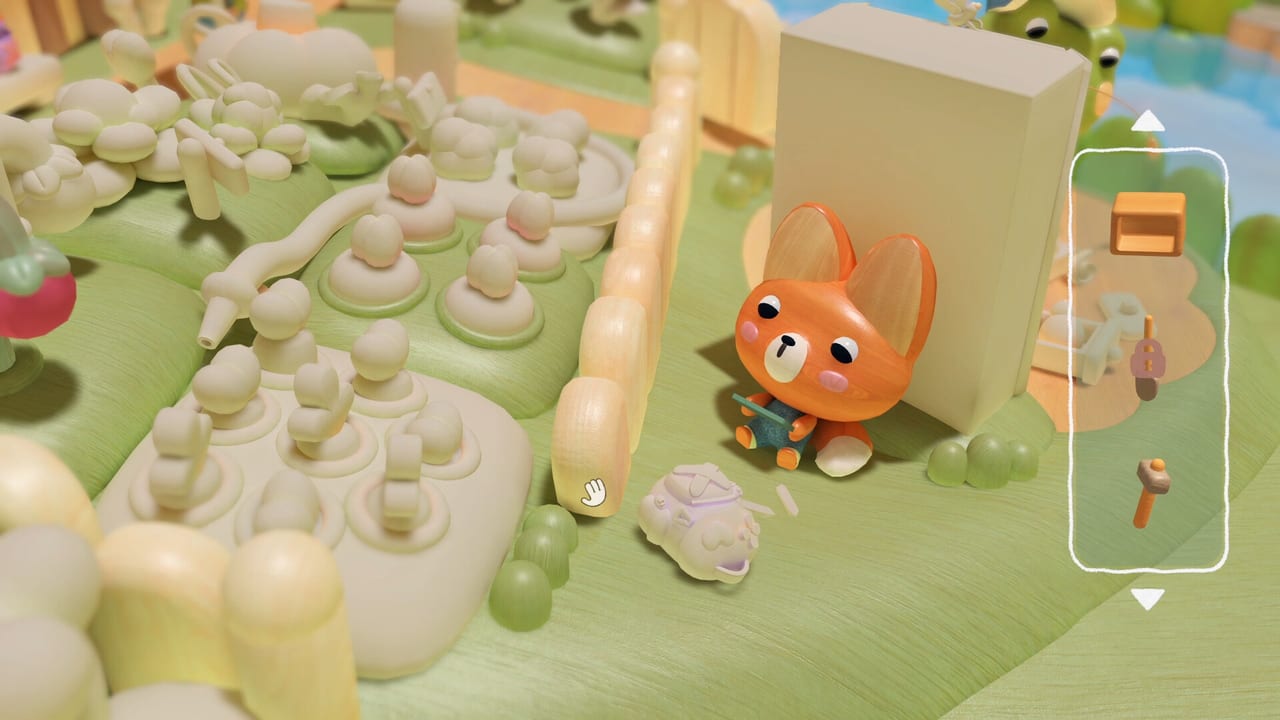
Woodo is a cozy 3D puzzle about putting wooden toys back where a memory says they belong. You do not manage a village, fight a boss, or race a clock. You orbit a small stage, pull objects from a sidebar, and listen while Foxy — a city girl sent to the countryside for the summer — tells you what that room used to feel like.
The loop is easy to describe and easy to rush. Slow down. Each correct snap paints the object, wakes a tiny animation, and often unlocks the next line of narration. If you treat it like a hidden-object clicker, you will miss the jokes in the wood grain.
This page is the rules primer. For button maps see Controls. For the two demo rooms see the demo walkthrough. For stubborn sockets see puzzle tips.
The core loop
- Look at the pale wooden scene. Early on it is almost colorless, like a sketch waiting for paint.
- Open the sidebar stash. Every remaining piece lives there: cups, cats, chairs, plants, tools, snacks, the odd goose.
- Orbit, pan, and zoom. Pieces hide on the far side of a table, inside a cupboard, or under a cloth you have not lifted yet.
- Drag a candidate to a socket that matches its silhouette. A correct hit clicks. A miss simply refuses; nothing punishes you.
- Watch the object gain color and, often, a small performance: steam, a blink, a wobble.
- Listen. Foxy’s story is gated on those clicks. Finish a cluster of objects and the memory sharpens.
Assembling is not linear. Official copy is explicit: you have to turn and explore the 3D space to reveal hidden pieces. If the sidebar still holds a teaspoon, the spoon is probably sitting in a drawer you have not opened, not on the table you already filled.
What “coloring in” means
Woodo markets itself as a 3D coloring book you can touch. That is not a metaphor for a paint tool. The diorama starts as raw wood. Correct placements infuse pigment and life. Leave a gap and the room still feels unfinished, which is useful: empty pale patches are hints.
Some objects are themselves puzzles. Preview coverage mentions a cupcake built piece by piece before it joins the larger breakfast scene. Expect nested toys in the full game: assemble the small thing, then seat the small thing in the big thing.
Assistance and pacing
There is no timer and no “mission failed” banner. The game adapts to your pace and can offer assistance when you stall. Use that. Woodo is not a test of stubbornness. If a hint highlights a region of the scene, trust it, then still rotate — the highlight is a neighborhood, not a pixel.
Narration is English by default in the demo, with subtitles in 19 languages. The full release adds full voiceover in eight languages, including English, French, German, Spanish, Japanese, and Korean. Miriam-Teak Lee voices Foxy in English. If you want the story context before you play, skim story explained and the Foxy page. If you want it cold, skip those until after the demo.
Your first session checklist
- Confirm the demo install on Steam, PS5, Xbox, or Switch. Details live on the demo walkthrough and news pages.
- Sit somewhere you can hear wood taps. Several preview writers turned music down and effects up; the click is half the toy.
- Complete the introduction, then the two full dioramas, without opening a spoiler guide on the first pass.
- Only then use puzzle tips or the walkthrough if a piece still sulks in the sidebar.
- After you quit, decide whether the deluxe extras matter. That comparison is on editions.
Platforms and input
Woodo launches September 16, 2026 on PC via Steam, PlayStation 5, Xbox Series X|S, Nintendo Switch, and Nintendo Switch 2. Switch 1 owners who buy the game receive a free Switch 2 upgrade. Switch 2 supports mouse controls through Joy-Con 2, which is the closest console feel to the PC mouse loop.
On PC, a mouse is the natural fit: you point at a socket the way you would seat a real figurine. A gamepad works — the demo shipped with controller support — but camera orbit takes a minute to trust. Read Controls before you blame the puzzle.
Steam Deck is playable according to the developers, with early support and no polished touchscreen path yet. If you care about handheld PC, treat Deck as a bonus, not a promise, until a post-launch compatibility note lands in updates.
How this wiki is laid out
- Play loop: this page, Controls, puzzle tips, soundtrack, accessibility
- Demo: demo walkthrough
- Story cast: Characters, Foxy, Ben the Frog, story explained
- Buying: release date, editions, system requirements, stores
- Reference: scene list, official links
Woodo is single-player. You will not find raid timers or gacha banners here. The useful questions are “where does this wooden cat sit?” and “why is Foxy talking about geese?” Keep those two in mind and the rest of the wiki is just a well-lit workbench.
Frequently Asked Questions
Quick answers to the most common questions.
How do I play Woodo?
Orbit a wooden diorama, drag sidebar pieces onto matching sockets, and listen as color and narration fill in. Start with this page, then Controls.
Is there a fail state?
No. Wrong placements do not break the scene. The game can offer assistance, and you can take as long as you like.
Should I play the demo first?
Yes. The demo includes an introduction and two full dioramas. Use the demo walkthrough only if you get stuck.
Does Woodo have multiplayer?
No. Woodo is a single-player story puzzle. There is no online or local second player.