
Woodo How to find every wooden piece
Search like you are rummaging a toy box, not scanning a hidden-object screenshot.
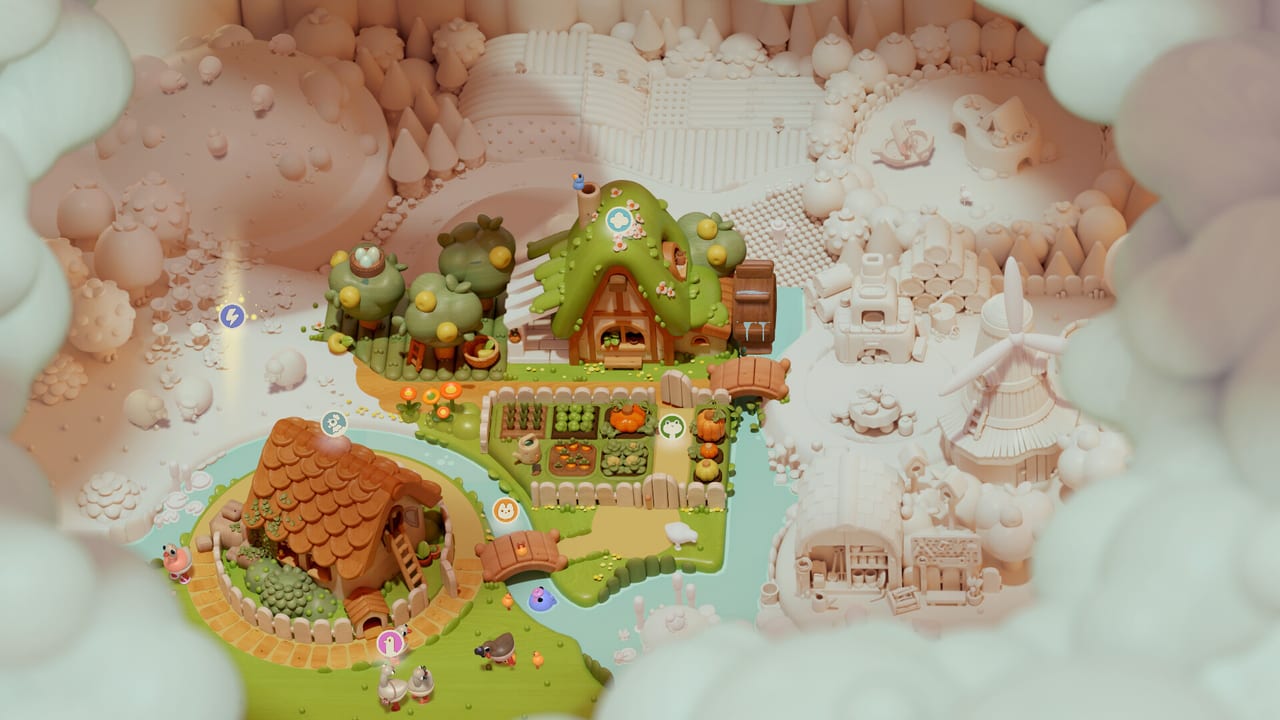
Woodo is a find-the-object game that pretends to be a construction set. The stash tells you what is left. The camera tells you where. If you only cycle the sidebar, you will place the obvious cups and bounce off everything that lives in a drawer.
This page is the search method. It does not spoil individual gags from the demo walkthrough. Read Getting Started first so you know what a successful snap looks like.
Read pale wood like a heat map
Unfinished surfaces stay raw. Finished objects wear color and often a tiny animation. When you are lost, stop grabbing. Orbit until you see a patch that still looks like untreated maple. That patch is the socket neighborhood.
A pale table with colorful plates still has work on the underside, the far edge, or the chairs. A colorful room with one pale goose is not 95% done; that goose is a scene. Zoom it.
Search order that actually finishes rooms
Use the same route in every diorama, including trailer rooms on the scene list:
- Horizon orbit — one slow 360 at medium distance. Note lids, beams, animals, and anything with a hole.
- Work surface — tables, counters, ship decks. Seat the large furniture first so small pegs have context.
- Floor ring — shoes, bowls, toys, and the things people kick under a bench.
- Walls and shelves — hooks, clocks, hanging herbs, shop signs.
- Ceiling and rafters — loft beams, ship rigging, lanterns. If you never look up, you keep a “mystery” piece forever.
- Containers last-but-not-least — drawers, chests, ovens, backpacks, cupcake stands. Open them when the outer room is mostly colored so the interior reads as a new miniature stage.
If you skip to containers too early, you assemble a cupcake with no plate. If you skip containers too late, you orbit a finished table wondering why a cherry is still in the stash.
Nested puzzles
Preview coverage is consistent: some objects are built in isolation, then placed. A cupcake is the public example. Mentally tag stash pieces that look like parts of a part — frosting, a candle, a lid, a wheel. Those rarely belong on the big floor on the first try.
Build the miniature against its own silhouette if the UI offers a sub-stage. Then treat the finished miniature as a new stash item. Fighting the nested toy as if it were a floor clutter piece is the most common self-inflicted stall.
Silhouettes, not themes
A wooden cat does not automatically sit on a hearth because “cats like fires.” It sits on the peg that matches its haunches. Theme is flavor; silhouette is law. When two objects feel equally “story correct,” compare undersides and holes.
Ghost previews, when they appear, are more trustworthy than narration. Foxy can talk about breakfast while you are still seating a stool. Listen for mood, look for pegs.
Animals and “roommates”
Geese, goats, cats, and frogs show up in trailers and in Foxy’s opening rant. Some are pieces. Some are sockets. Some start pale and become jokes when a hat or a snack seats on them. If a creature is still raw wood, it is content, not background.
Ben the Frog is a character in the summer story, not a puzzle token you drop on a lily pad in the first minute. Do not force story characters into leftover holes. If you are curious about who is who, keep Characters in a second tab.
When to take a hint
Take assistance after:
- two full orbits
- one pass of every lid you can see
- one zoom-in on every remaining pale patch
Do not take a hint after twenty seconds. Do not refuse a hint after twenty minutes. Woodo is built to comfort. The hint is part of the toy, like a grandparent pointing at the missing chimney on a wooden train.
Audio helps. A rejected hover is quiet. A seated piece clicks. If you play with music loud, you lose that tell. Several demo write-ups recommend raising effects; they are right.
Platform-specific gotchas
- Gamepad overshoot — you thought the piece was wrong; you missed the peg. Slow the camera. See Controls.
- Handheld Switch — zoom more. Dense breakfast tables need a bigger picture than a 7-inch panel at arm’s length.
- Steam Deck — skip the unfinished touch path; use trackpads.
- Busy lighting — some scenes go from pale to saturated fast. If color bloom blinds a nearby pale patch, orbit 20 degrees and look again.
After the method sticks
You should be able to finish the demo rooms with this route. If a specific loft chest still laughs at you, open the demo walkthrough. If you are prepping for launch week, skim the scene list so ship decks and village shops do not surprise your search order. And if the story is doing more work than the sockets, that is fine — read story explained and decide whether Woodo is a puzzle night or a memoir night for you.
Frequently Asked Questions
Quick answers to the most common questions.
How do I find hidden pieces in Woodo?
Orbit for pale wood, then search table, floor, walls, ceiling, and containers in that order. Open every lid before you assume the stash is wrong.
Why will a piece not snap?
Wrong face of the socket, wrong nested stage, or analog overshoot. Flip the camera and compare the silhouette, do not spam the slot.
Should I use hints?
Yes, after two orbits. Assistance is part of the design. Woodo is not a leaderboard puzzle.
Are animals decorations?
Not always. Pale geese, cats, and other creatures are often unfinished pieces or sockets. Zoom them.